Product tour · A week at a cleaning company
From Monday’s plan to Friday’s invoices, in one app
Follow a NZ cleaning company’s week, screen by screen: the crew’s day on their phones instead of a group chat, photos filed by visit, and invoices that go to Xero without typing them twice.
Start free trialPrefer a walkthrough? Book a demo or chat on WhatsApp
No credit card needed. You will not be charged automatically.
Built inside It's So Clean on Auckland's North Shore: 3,000+ jobs run through JobNest since October 2025. Read their story
Chapter 1 · Plan the week
Step 1 · Monday, 7am
Before: rebuilding the same week of cleans, over and over.
The week is already there when you open it
Regular cleans repeat on their own, so Monday starts with the week filled in, crew by crew (here, the Kōwhai Crew). Move a visit with a drag. No spreadsheet to rebuild.
- See who is working each day, right under the date
- Day notes at the top: who is off, keys to pick up, special requests
- Lunch breaks and the distance to the next home on each visit
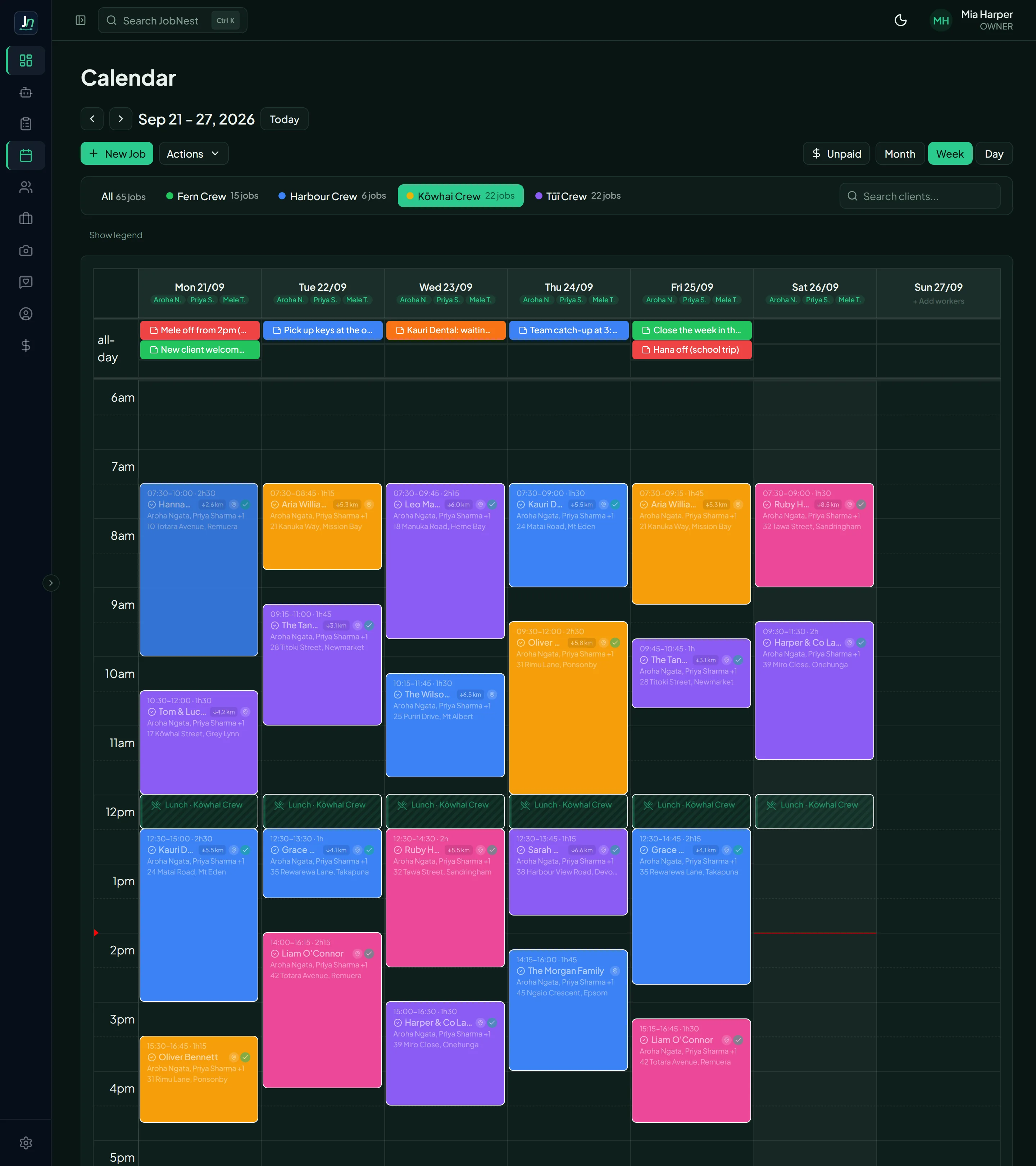
Screens from the real JobNest app. The business, people and addresses are made up; the before and after photos are from It’s So Clean, the Auckland cleaning company JobNest was built in.
Step 2 · Every visit
Before: access codes buried in a group chat.
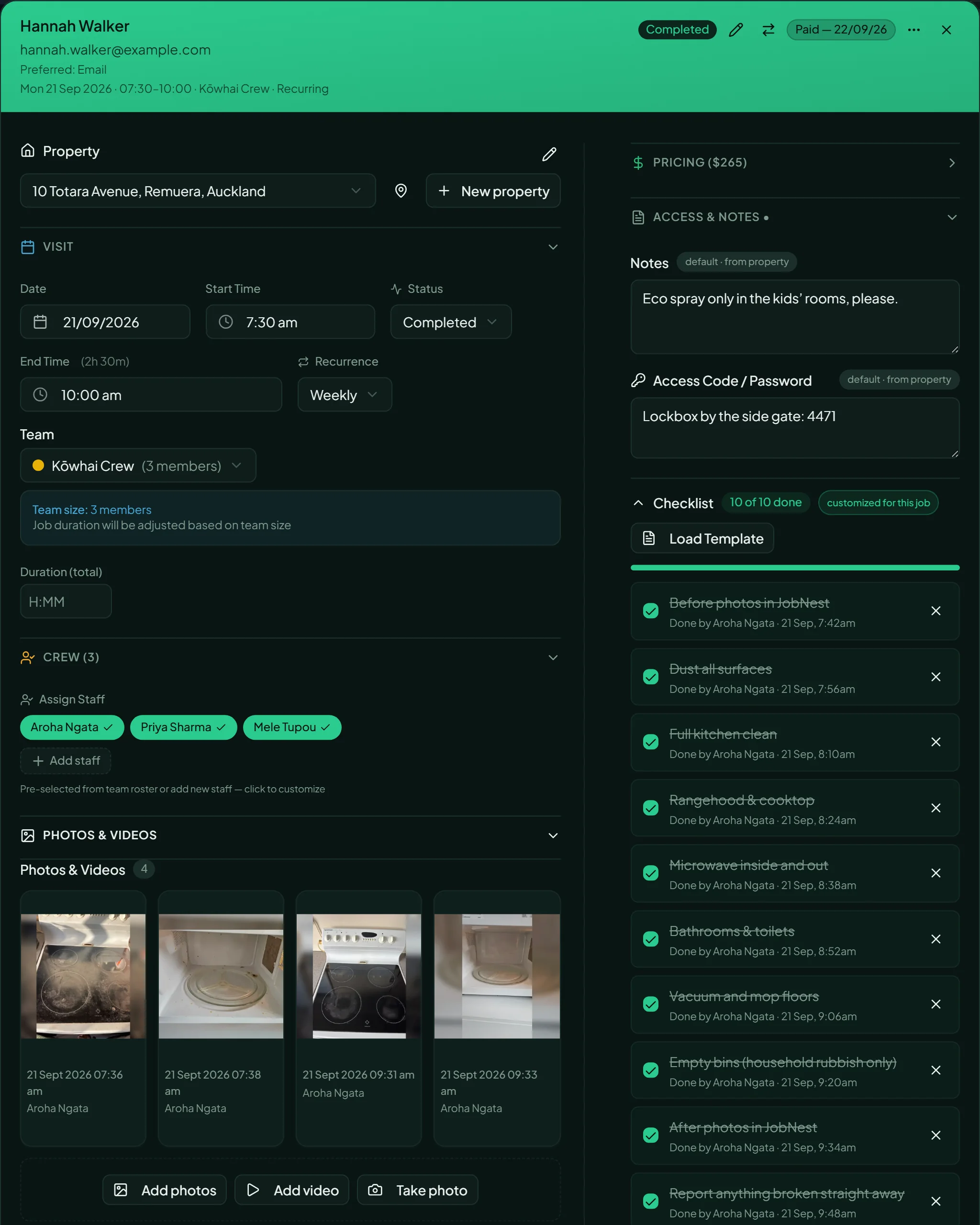
Every home’s details, and proof the job was done
Access codes and house notes live with the home, not in a group chat. The crew ticks the checklist as they go, and every tick shows who did it and when, next to the before and after photos.
- Date, time, crew and repeat schedule in one place
- Checklist ticks with who did them and when
- Price and GST worked out for you
Chapter 2 · On the road
Step 3 · On the roadGrowth and up
Before: the team texting to ask where they are going next.
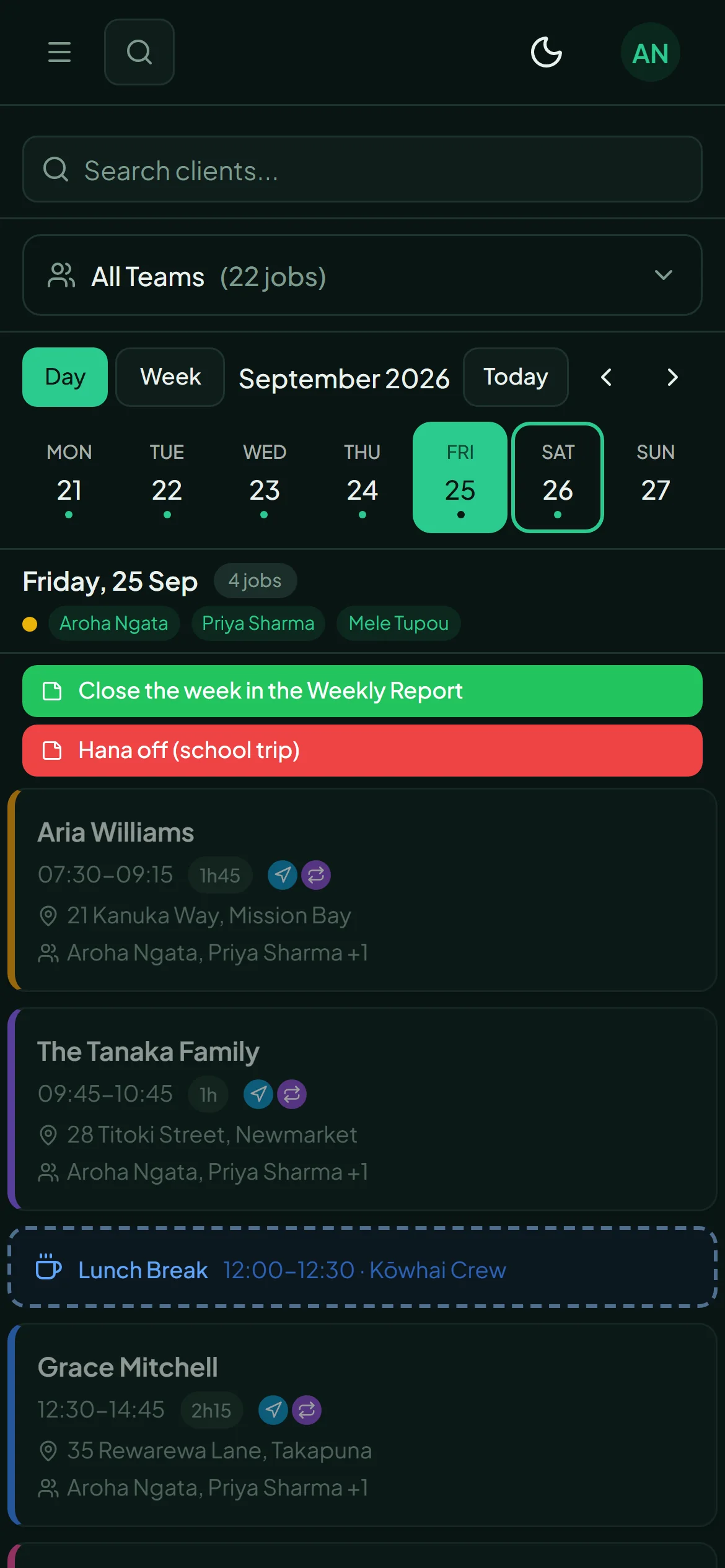
Your team’s day, on their phone
Each person signs in and sees only the visits they are rostered on: where to go, when, the notes for each home and the checklist.
- No more addresses sent one by one on WhatsApp
- Tick the checklist and add photos from the job
- Everyone always sees the latest version of the day
Step 4 · After each clean
Before: digging through phones when a client asks for proof.
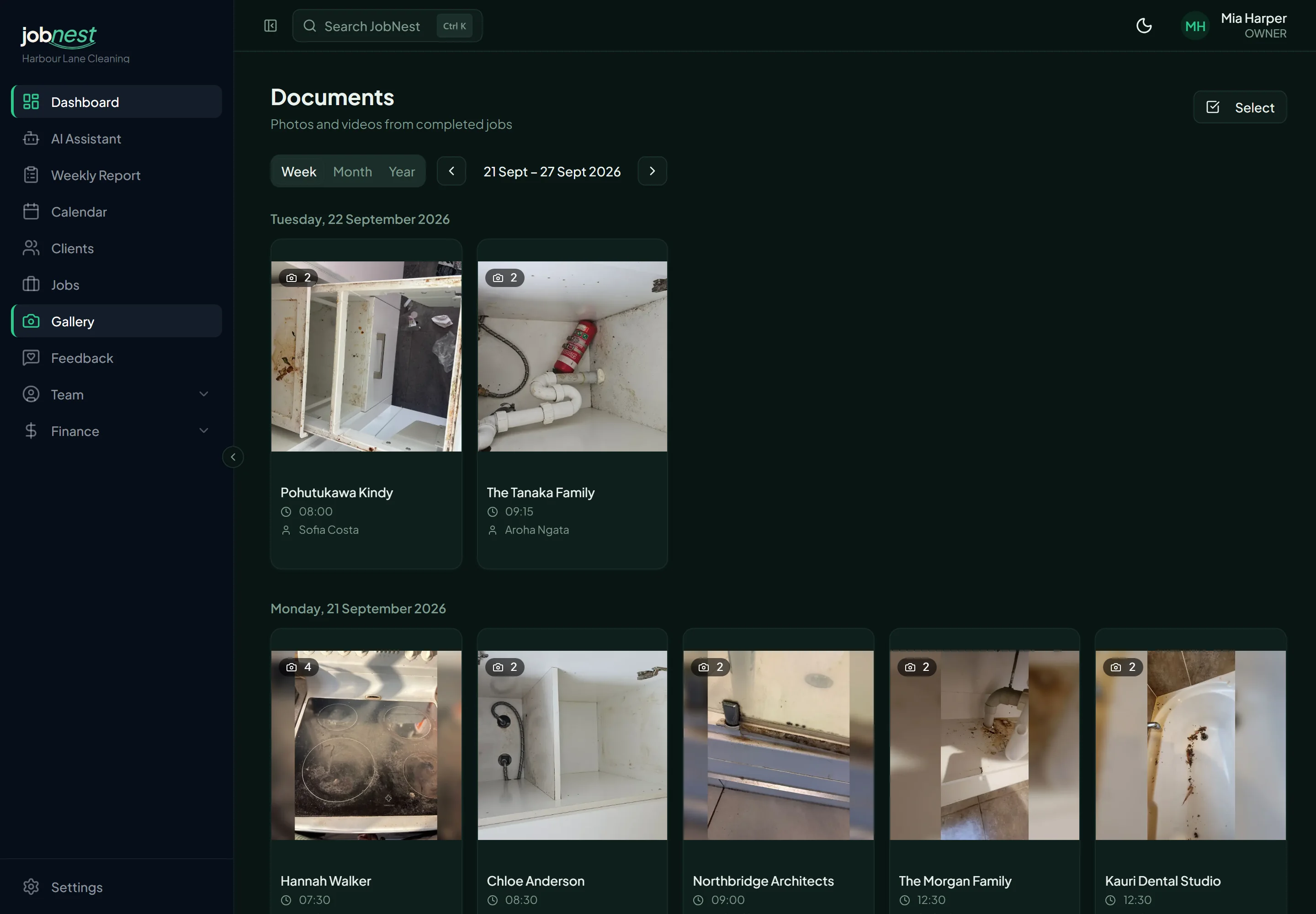
Before and after photos, sorted for you
Photos the crew adds from the job land in the right client’s album by day, each saved with the time it was added and who added it. Find them in seconds when a client asks, send a proof of clean, and have a dated record if a job is ever questioned.
- An album per visit, grouped by day
- Every photo keeps who added it and when
- Send the photos to the client straight from JobNest
Chapter 3 · Friday: hours and money
Step 5 · FridayBusiness & Enterprise
Before: closing the week with hours of spreadsheets.
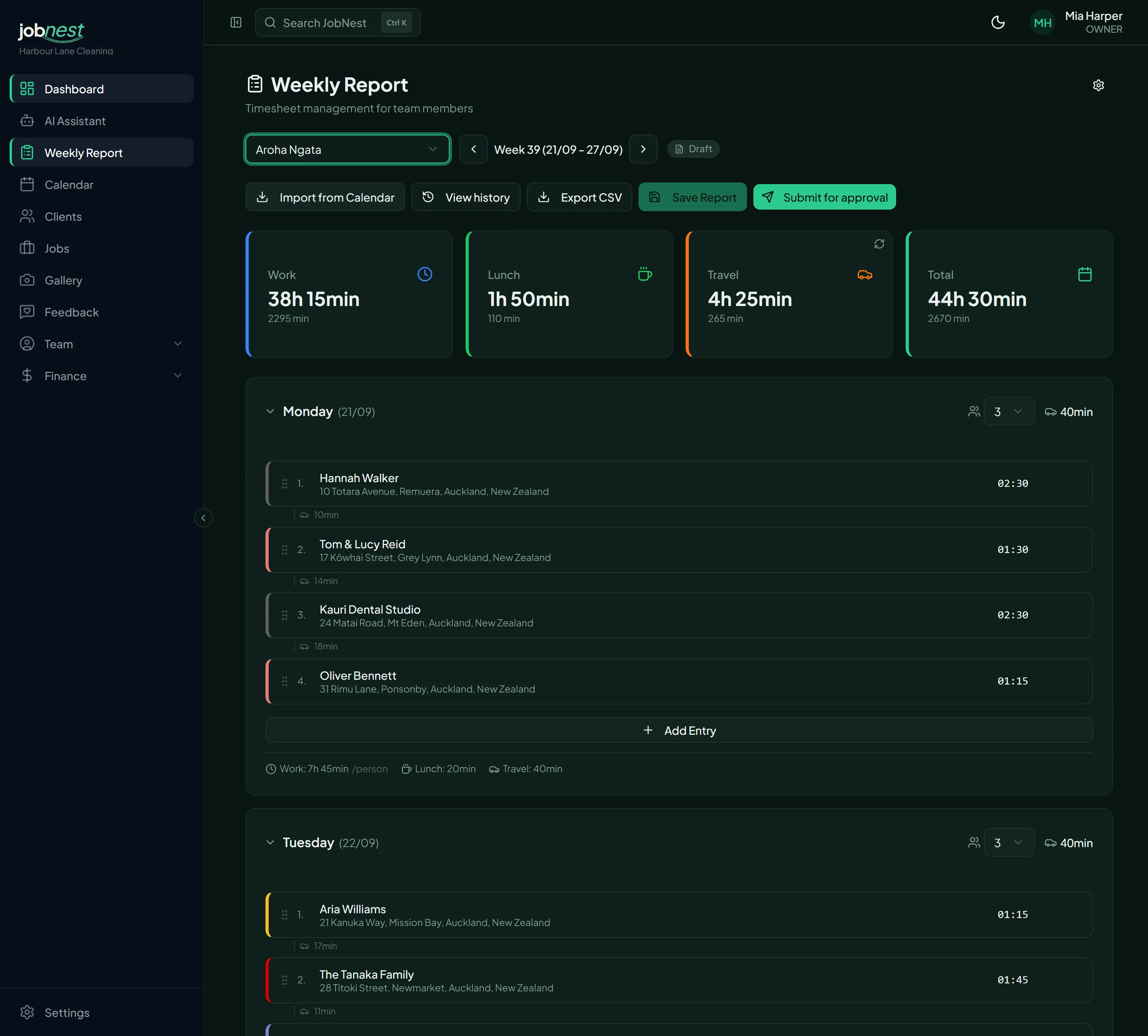
Timesheets that fill themselves in
Each person’s week fills itself in from the calendar: every home they cleaned, the hours, the paid rest breaks and the driving between homes. Check it, adjust if needed and approve.
- Pulled straight from the calendar, no timesheets to type
- Driving time between homes, from the real addresses
- Paid rest breaks follow NZ rules
“I used to lose more than 6 hours every week closing the week — hours, breaks, travel. Now JobNest pulls it all straight from the jobs we already run. It's so much easier.”
Step 6 · Friday afternoon
Before: invoicing as a second job at the end of the week.
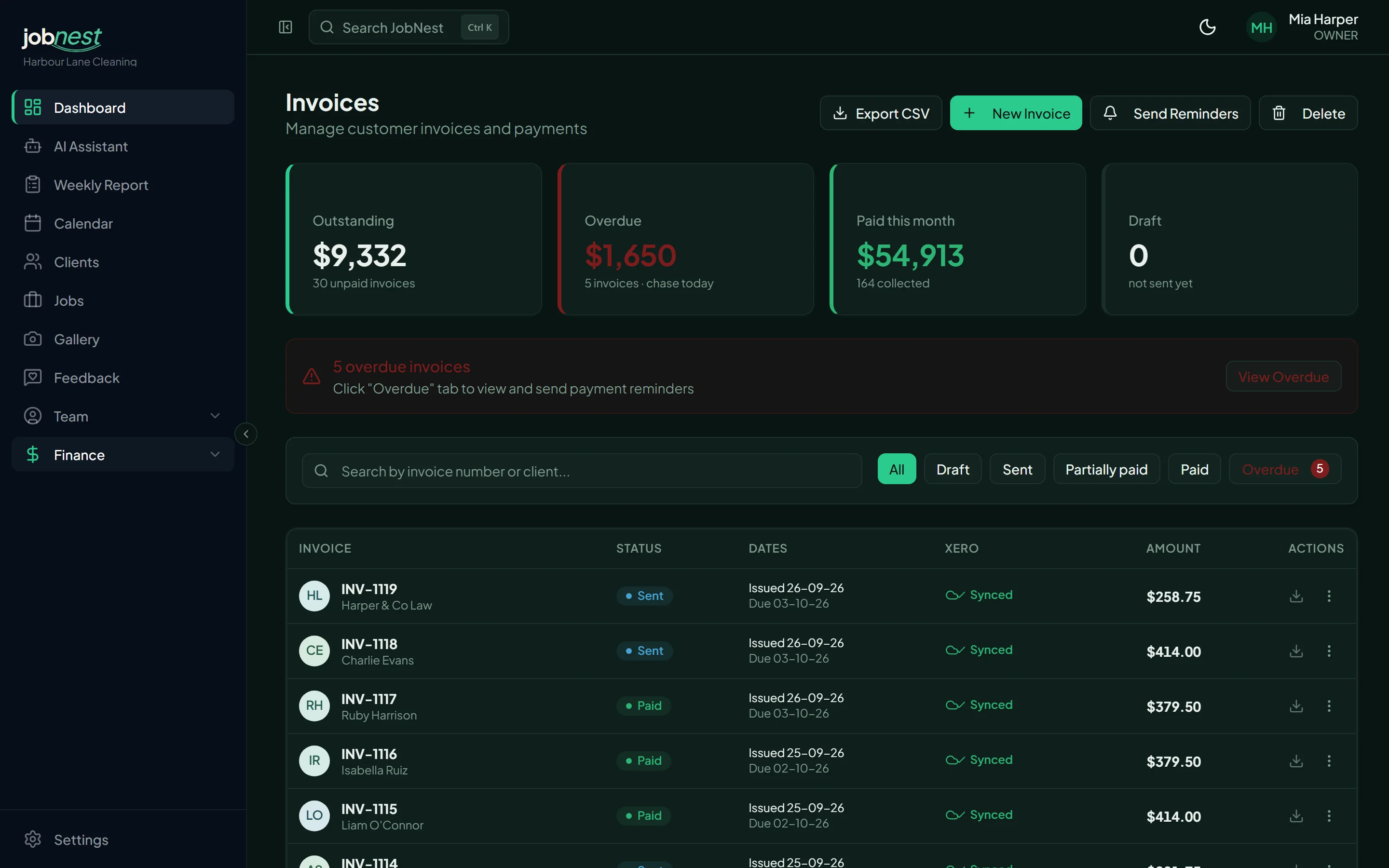
Invoice the week without typing it twice
Turn finished cleans into invoices and see what is paid, sent or overdue. On Growth and up, invoices go to Xero, so your books stay up to date.
- Invoices from finished visits, in batches
- Paid, sent and overdue at a glance, with reminders in one click
- Two-way Xero sync on Business and Enterprise: invoices go to Xero, payments come back
Step 7 · Before the weekend
Before: a notebook of who paid cash and who still owes.
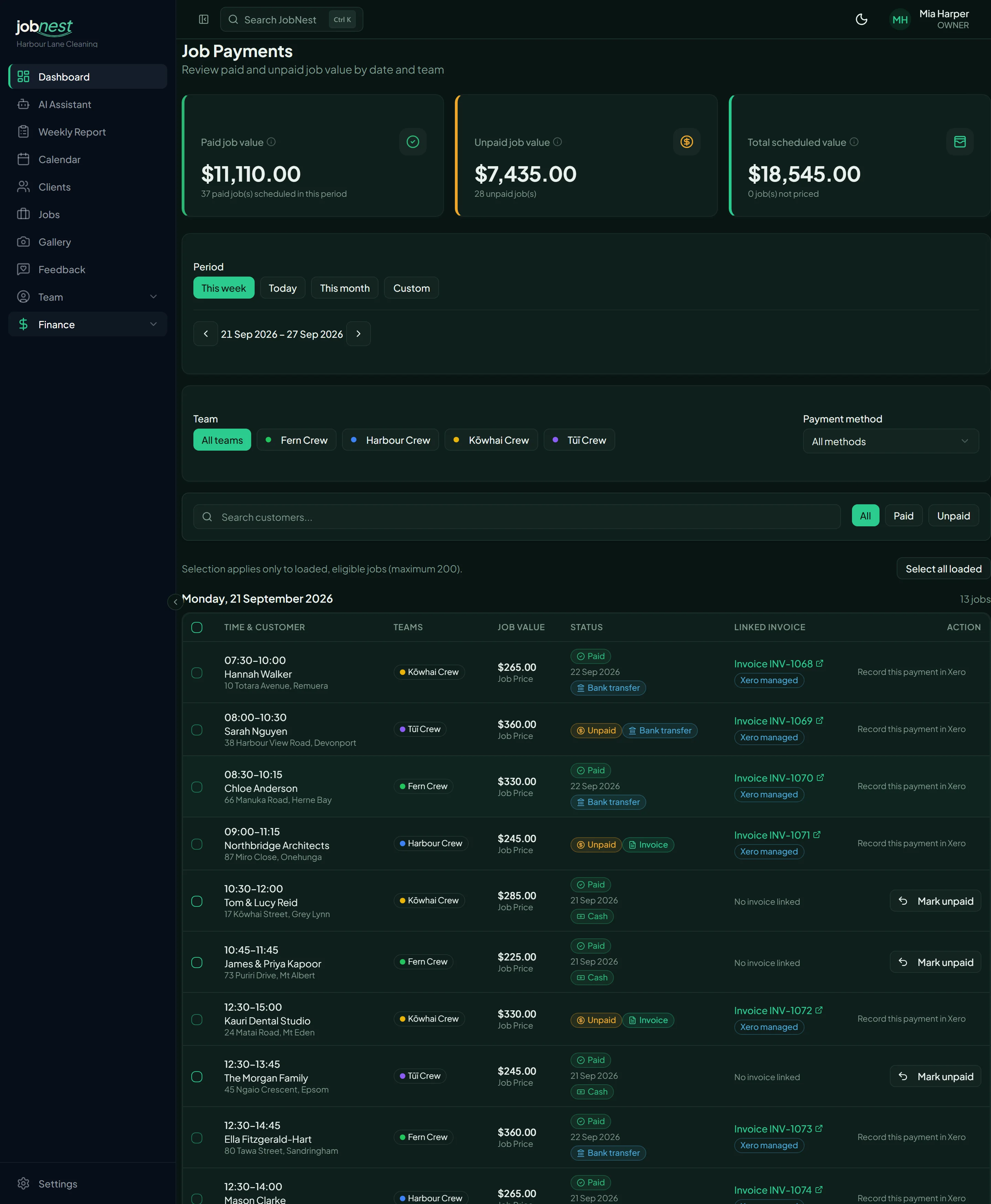
Know who has paid, and how
Every visit shows whether it has been paid and how the client pays: cash, bank transfer or invoice. Mark several visits as paid at once.
- Paid and unpaid visits, week by week
- Filter by cash, bank transfer or invoice
- Mark a batch of visits as paid in one go
Want your Fridays to look like this?
Chapter 4 · Win more work
Step 8 · The day after a first clean
Before: never remembering to ask for reviews.
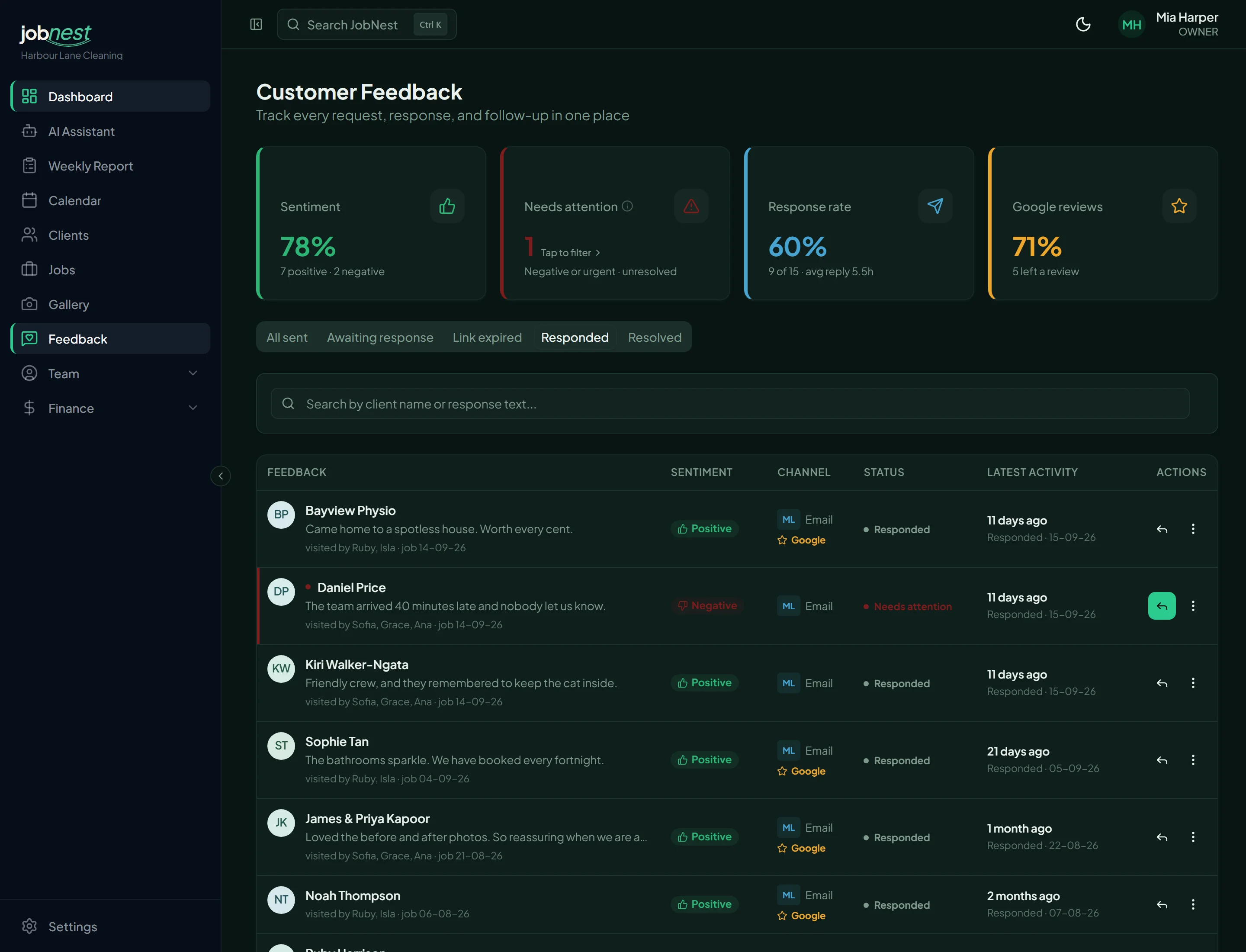
More Google reviews, without chasing anyone
Switch it on once and, the day after a new client’s first clean, JobNest emails them to ask how it went. Every client gets a one-tap link to your Google reviews, and anyone who had a problem can also tell you privately first, so you can fix it fast.
- Runs by itself once it is switched on
- Every reply, good or bad, in one place
- See who went on to your Google page
At It’s So Clean
+32%
It’s So Clean’s invoiced revenue in July 2026, their best month since switching feedback emails on, compared with April 2026, the month before. Excluding GST. One business’s result, not a promise.
Step 9 · When a new enquiry comes inBusiness & Enterprise
Before: writing the same price reply for every enquiry.
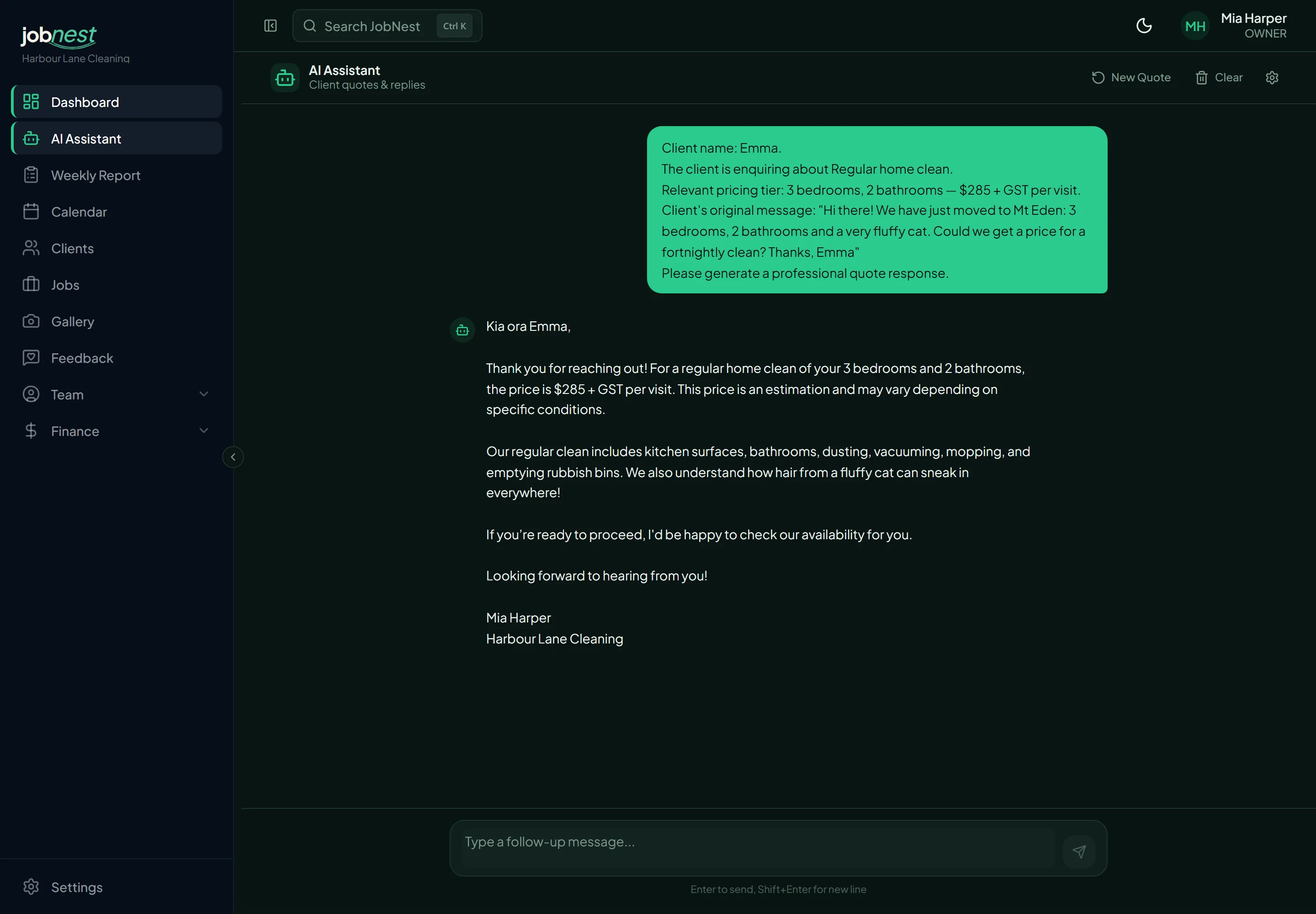
A quote ready to send in seconds
Pick the service and the size of the home, paste the client’s message, and the AI Assistant writes a friendly reply with the right price from your own price list.
- Written from your prices, what is included and your rules
- Your tone of voice and your sign-off
- Copy it straight into WhatsApp, text or email
Step 10 · Any time
Before: adding up the week in a spreadsheet.
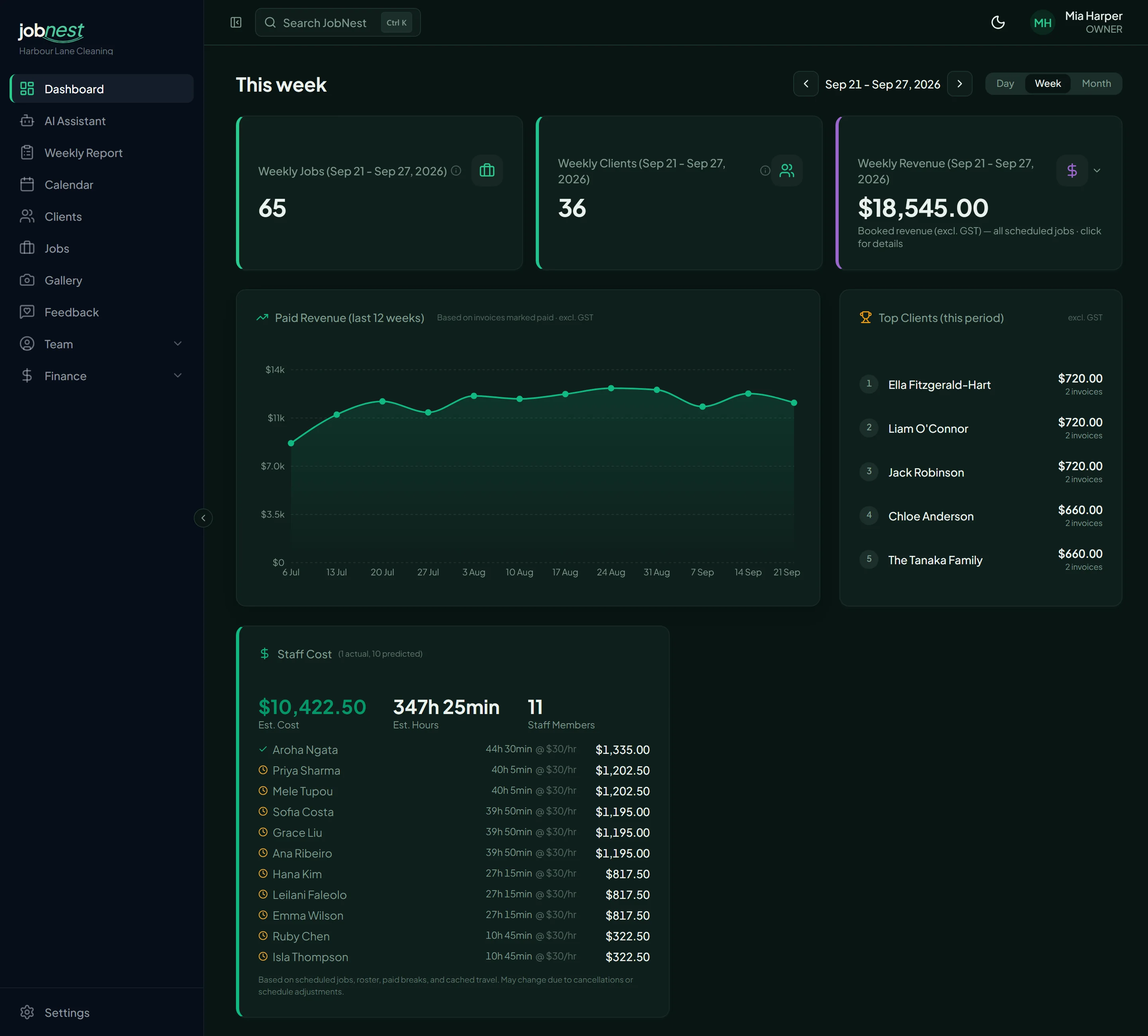
The whole business at a glance
This week’s jobs, clients and booked revenue, twelve weeks of paid revenue, your top clients and an estimate of this week’s wages, all on one page.
- Booked revenue for the week, excluding GST
- Twelve weeks of revenue from paid invoices
- This week’s wage estimate, person by person
Time-Back Guarantee
Run your schedule and invoices in JobNest for 30 days. If it hasn't saved you at least 4 hours of admin a week on Growth, 8 on Business or 12 on Enterprise, email us and we'll refund everything you've paid. No forms, no arguments. You keep your data. Claim within 30 days of your first payment.
Read the guarantee termsRun next week in JobNest
Try any paid plan free for 14 days, or stay on Starter for free. No credit card needed and no automatic charge.
Start free trialRather see it first? Book a demo or chat with us.